Claude Just Made It Easier
to Leave Claude
Claude Code now reads AGENTS.md. Here is how to move between Claude and Codex without starting over.
 Lucija Tomšić
September 20, 2026
10 min read

On this page
- Can Claude Code read AGENTS.md now?
- What is AGENTS.md and why does it matter?
- How do you share one instruction file between Claude Code and Codex?
- Why did I switch my default from Claude to ChatGPT and Codex?
- What does Codex do better for me?
- How do you stop an AI agent from changing things you did not ask for?
- How often should you check what your AI remembers about you?
- How do you switch AI tools without rebuilding your setup?
- Is Claude still worth using?
- Sources and further reading
Claude Code 2.1.277 now reads AGENTS.md, so Claude Code and Codex can share one project file. Here is how to switch AI tools without starting over.
On September 18, 2026, Claude Code 2.1.277 added built-in support for AGENTS.md, the project instruction file that Codex and several other AI tools already use. In plain English: Claude Code and Codex can now start from the same project briefing, so moving a project between them no longer means explaining it from scratch.
I am a non-developer who uses AI every day to research, write, plan, build websites, repair projects and create automations. This is not a technical model comparison. There are no benchmark scores, token counts, context windows or API prices here.
My question is simple: which tool helps me turn an idea into something useful with the least friction? In September 2026, my answer is ChatGPT and Codex. Ask me again next month.
Below you will find exactly what changed, how to set it up, why I switched my default tool, and two lessons about agent permissions and AI memory that the switch taught me. At brisk., I teach non-technical people how to use AI, so I keep it practical.
Can Claude Code read AGENTS.md now?
Yes. Since Claude Code 2.1.277, released on September 18, 2026, Claude Code reads AGENTS.md when a project has no CLAUDE.md. If a Claude file exists, it keeps priority and AGENTS.md is ignored by default.
- Default: no
CLAUDE.mdin the project means Claude Code loadsAGENTS.mdinstead. - Where to change it: the "Project instructions" setting in
/config. - Read both files: set
instructionFilestoclaude-md-and-agents-mdin your settings (example below). - Not everywhere yet: the release notes say the feature is not yet available on Bedrock, Vertex or Foundry.
To make Claude Code load both files, add this to your user settings, a --settings file or managed settings:
{
  "pluginConfigs": {
    "agents-md@builtin": {
      "options": { "instructionFiles": "claude-md-and-agents-md" }
    }
  }
}
When both files are read, a file that CLAUDE.md already imports is not loaded a second time. Anthropic's implementation notes explain the details.
What is AGENTS.md and why does it matter?
AGENTS.md is a plain text file that tells an AI agent how to work inside your project. It says what the project does, how it is organised, what the AI may change, what it must leave alone and when the work counts as finished. Think of it as a handover document for a new colleague: whoever reads it starts with the same picture.
Until September 18, many tools wanted this file under their own name. Claude Code used CLAUDE.md. Codex and several other tools use AGENTS.md.
So your project instructions were tied to the tool you started with. Switching meant keeping two files, linking them or explaining the project again.
How do you share one instruction file between Claude Code and Codex?
Put the shared instructions in AGENTS.md, then keep CLAUDE.md as a short pointer that tells Claude to follow it. That is how my projects were already configured, and it still gives me one source of truth. Before this update it needed some technical setup.
Now Claude and Codex can start from the same main explanation of your project. This is not the end of compatibility problems, though.
- Travels with you: the layer that explains what your project is, how it works and what done looks like.
- Stays tool-specific: skills, subagents, tool settings and permissions.
For the full step-by-step setup, read How to Build Tool-Agnostic AI Workflows With AGENTS.md.
Why did I switch my default from Claude to ChatGPT and Codex?
Because of one project. A few weeks ago I built a carousel maker for Instagram and LinkedIn. You give it a topic or paste your own text, it creates an outline, lets you edit the slides and exports the carousel as PNG or PDF files.
I built the first version in August with Claude Fable 5, then Anthropic's most capable generally available model (today it is Fable 5.1). It had the features, but the design and user journey felt like nobody had thought them through. It looked like a kid designed it.
My instruction had been broad:
Make the interface easy to use and intuitive.The result was still not something I would put in front of users:
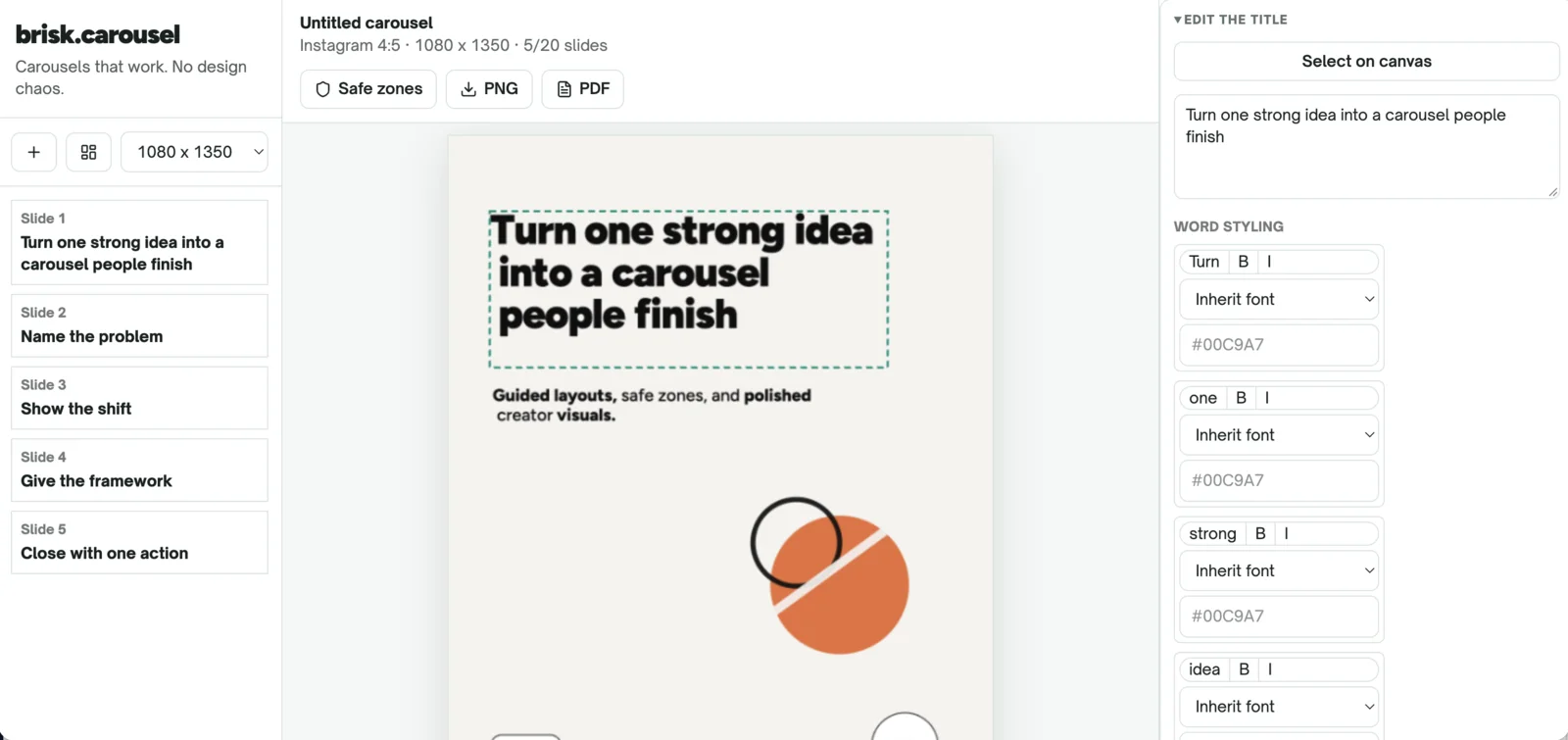
Version 1, built with Claude Fable 5: all the features, little design or flow.
Then I opened the same project in Codex and gave Astra, OpenAI's GPT-6 model, an equally unsophisticated brief:
Audit the whole project. Fix what is broken.
Make the interface easy to use and intuitive.
The version I got back was very close to what I had in mind:
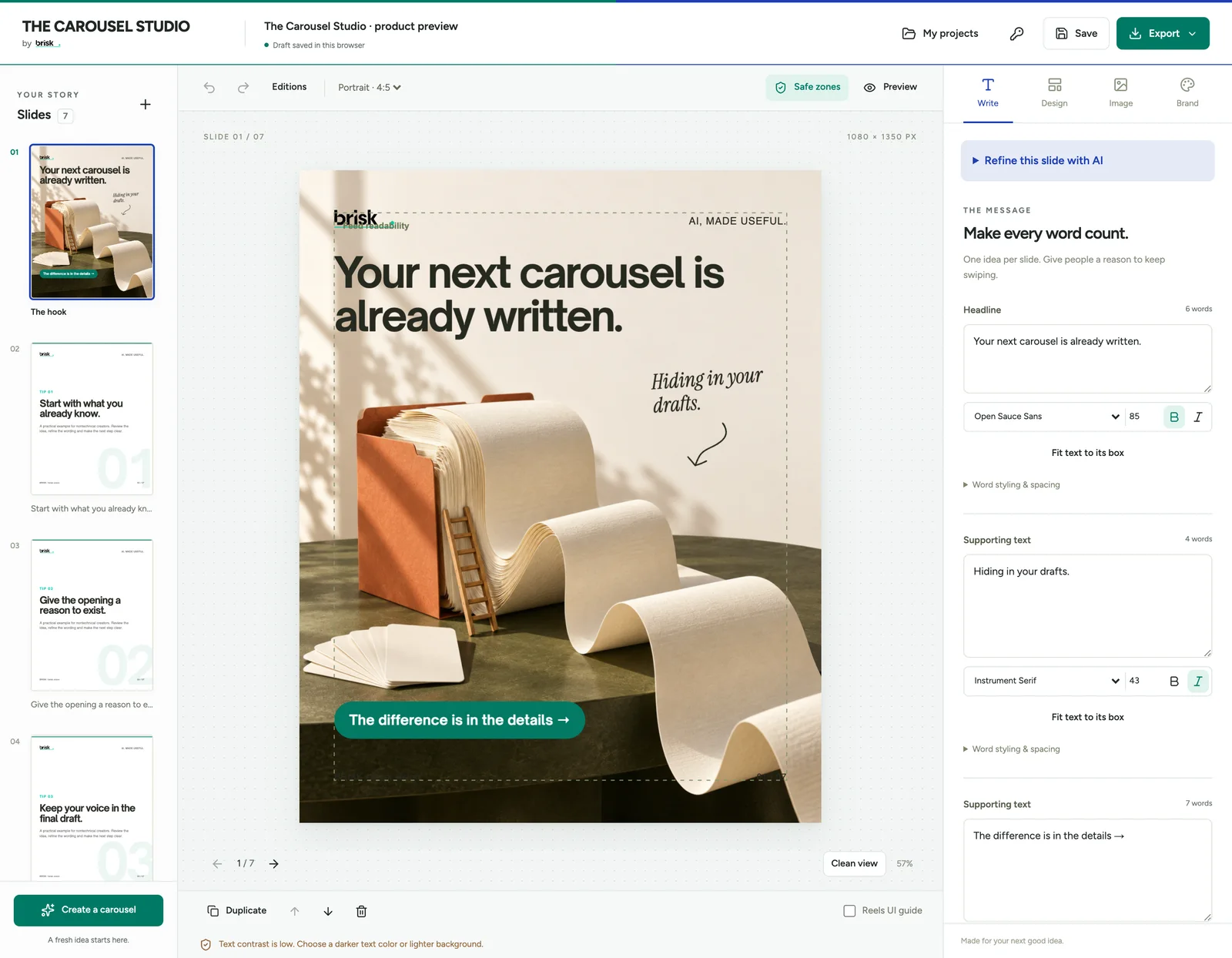
Version 2, after one pass in Codex with Astra.
I plan to make it publicly available soon, and the brisk. newsletter is where I will announce it.
I know detailed context usually produces better work. I teach people to explain the task and define what success looks like. Then I open my own project and type "please fix this." That is fully on me, and it is how many non-technical professionals really use AI. Astra understood the outcome behind my incomplete instructions and fixed the design and usability in one pass.
This was the moment ChatGPT stopped being Claude's slightly more visual alternative. A few weeks earlier, when I compared the new ChatGPT desktop app with Claude, I had called it close to a draw. Image generation built into the same place put ChatGPT slightly ahead, but only slightly.
Was this a controlled test?
No. Astra received an existing project with visible problems instead of an empty folder. I also compared two environments: Claude Code with Fable, and Codex with Astra, both used in VS Code.
I am not claiming Astra is objectively better. I am explaining why I currently prefer the whole ChatGPT and Codex experience: what the model understood, how little guidance I needed and how easily I could review the result.
What does Codex do better for me?
Four things, and most of them come from the experience around the model rather than the model itself. These are personal preferences from daily use, not a feature comparison.
Astra is included in the plan I already use
On my current plans, I can use Astra in Codex and Work as part of my ChatGPT allowance. Using Fable on Claude Pro requires additional usage credits. Plans and limits change, so check the OpenAI allowance guide and the Anthropic plan guide before you decide on price alone.
What matters in my daily work is simpler: I currently get further with ChatGPT before I have to think about limits. That makes me more willing to hand it large, realistic projects.
Codex asks questions in a way that works for me
When Codex needs a decision, it can show me a few clear options in the interface. I choose a direction without writing another long prompt. After several hours with an AI, every unnecessary explanation feels like friction. Claude does the same, I just find the Codex interface in VS Code more user friendly.
Codex makes the result easier to inspect
Files, previews and other artifacts sit apart from the conversation. I can see what was produced, review it and continue from there. Claude does something very similar. My preference at the moment is the way Codex and ChatGPT present the outcome.
Images are part of the same workflow
With ChatGPT, I can move from an idea to the copy and the image without changing tools. In my carousel app, the improved version generated a fitting image without me writing a prompt, leaving the tool, saving the file in the right folder and coming back. Astra steered all of that.
How do you stop an AI agent from changing things you did not ask for?
Ask for a list of every change after each task, and set limits before you give an agent access to something important. I learned this from an audit that fixed something I had forgotten about.
On another project, I asked Astra to do one thing: audit it. The next day, an email from myself landed in my Gmail inbox. At first I was shocked and confused. It was a reminder to publish a blog post on one of my other websites.

The reminder email that landed in my inbox after the audit.
Then I remembered that I had asked Claude to build that reminder weeks earlier. It never worked, so I forgot about it. Astra found it during the audit and fixed it.
That is a win. But look at what happened: I asked for an audit, Astra made a change, and the change was useful. I still should have been told.
So after every task, I now ask for a list of what changed. Before I give an agent access to an important project, I also try to:
- Work on a copy or use version control.
- Ask for every file and setting it changed.
- Require approval before publishing, spending money or contacting anyone.
- Limit access to folders, accounts and credentials.
A tool can be excellent at the work and still need limits on what it may touch.
How often should you check what your AI remembers about you?
Check it occasionally, and especially after your work changes direction. Memory helps until it keeps applying decisions that are no longer true.
I had accidentally run another unfair experiment: memory was switched on in Claude and off in ChatGPT. Claude knew more about me. ChatGPT met each task with fresher eyes. You would expect more context to win, and sometimes it did. But Claude also kept bringing old decisions into new work.
I would change the positioning of brisk., ask for something based on the new direction, and Claude would remind me that months earlier I had said something different. It felt like an annoying teacher correcting me with my own old homework. People are allowed to change their minds. Businesses evolve, offers change, and a decision from six months ago should not silently overrule what you ask for today.
This is not proof that ChatGPT has better memory. I had memory switched off there, and any Claude user can switch it off too. Ask your tool:
What do you currently remember or assume about me, my work,
my audience and my priorities? Separate facts from preferences
and past decisions. Flag anything that may be outdated.
Then correct it. Delete what no longer applies, update what changed and add dates to decisions that may expire. More context only helps when it is still true.
How do you switch AI tools without rebuilding your setup?
Keep what describes you and your work in files you own, and keep tool-specific settings separate. You should not have to stay with a tool because it holds months of your context or because your project only makes sense to that one agent.
- For chat work: turn the useful context into one working brief about you, your work and your current priorities.
- For projects you build in VS Code: put the shared instructions in
AGENTS.md, so Claude Code and Codex start from the same explanation of the project.
I updated my free No More Lock-In handbook to help you do both. It shows you how to:
- Move useful context between ChatGPT and Claude
- Check what your current AI remembers about you
- Create one shared
AGENTS.mdfile for Claude Code and Codex - Keep tool-specific skills, settings and permissions separate
- Switch tools without rebuilding your setup
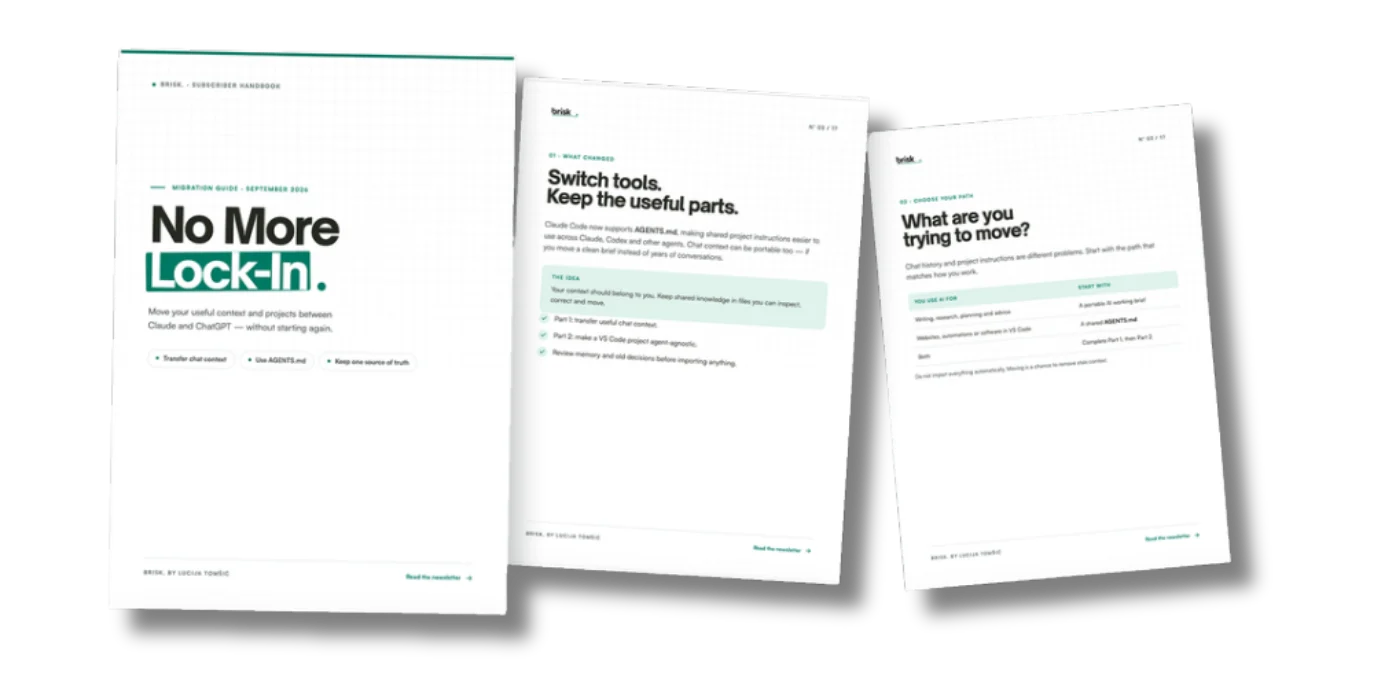
The No More Lock-In handbook, September 2026 edition.
Download the free 17-page No More Lock-In handbook →
Is Claude still worth using?
Yes. Claude is still a very good tool, and Claude was my default for months. Right now it is not, and next month my answer may change again.
The point is not to choose one AI and stay loyal to it. Your work, context and projects should be able to move when you do. Use the best tool for your work today, and keep your setup flexible enough to change your mind tomorrow.
Which AI tool is your default right now, and why? Tell me in the comments on the Substack version of this article.
Sources and further reading
- Claude Code 2.1.277 release notes (Anthropic, September 18, 2026): AGENTS.md support
- Claude Code AGENTS.md implementation notes (Anthropic): default behavior and the read-both setting
- Managing usage with GPT-6 Astra in Work and Codex (OpenAI Help Center): plan allowances
- Claude Fable models on your plan (Anthropic Help Center): plan allowances
- How to Build Tool-Agnostic AI Workflows With AGENTS.md (brisk., May 2026): full setup walkthrough
Open your main project and check which instruction file your AI reads first. That is the brisk. rule for switching tools: keep the briefing in a file you own.
Want this built for your business?
We audit one workflow, build the system on your tools and hand it over with documentation.