Claude now replaces Excel, Miro and your dashboard tool. Mostly.
Claude Sheets, Whiteboards and Data launched on 10 November. Here is what each can do, what it replaces and where it still falls short.
 Lucija Tomšić
November 15, 2026
11 min read
On this page
- What are Claude Sheets, Whiteboards and Data?
- Which tools can Claude replace in your stack?
- What can Claude Sheets do?
- What can Claude Whiteboards do?
- Can you use your own brand colours in a Claude Whiteboard?
- What does Claude Data do?
- How does sharing a Claude artifact work?
- Does Claude replace Microsoft 365?
- How do Sheets, Whiteboards and Data work together?
- Which Claude tool should you use for which job?
- What mistakes should you avoid?
- Bonus: a clip to show off
- A 30 minute plan for this week
- Verdict
- Honest limits
- Frequently asked questions
- Sources
Claude Sheets, Whiteboards and Data build spreadsheets, boards and dashboards in the chat. What each replaces, prompts to copy, and where they fall short.
You (or your employer) probably pay for a spreadsheet app, a whiteboard app and a data visualization tool. And you open all three from a different tab than the one where you actually do your thinking.
That tab switching just got optional. On 10 November, Claude added three tools that build those things inside the chat, and every one of them can be shared with a link. 🫡
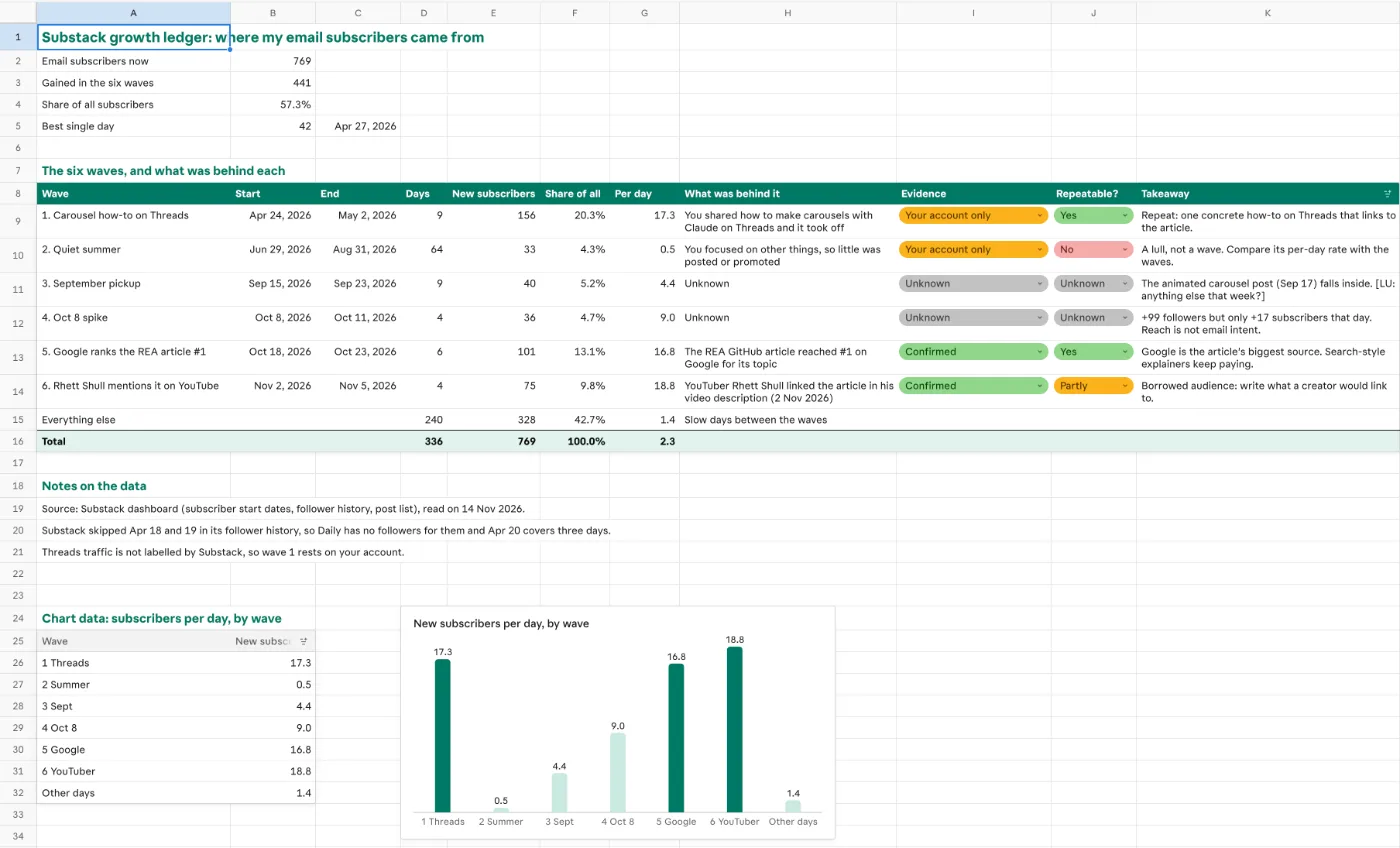
I tested all three the day after launch. Honest upfront: I used them on small jobs, so this is a first look and not a verdict for life. I will tell you where each one is strong, what it can replace in your stack, and where I would not trust it yet. To show you each tool, I walk you through all three using my own Substack analytics as the example. That is the only input I gave Claude to analyse, and I screenshotted the results below. The numbers only demonstrate what the tools can do, so ignore them and look at the features.
What are Claude Sheets, Whiteboards and Data?
On Tuesday 10 November, Anthropic launched Claude Whiteboards and Claude Sheets, both in beta. It also renamed Claude Dashboards to Claude Data and made it generally available. All three work on web, desktop and mobile, and Anthropic lists them for paid plans.
They join the artifact types that already existed: Docs, Slides, Design and Motion. The Register put it well when it said Anthropic is tiptoeing into Microsoft Office territory. And Claude Meetings is announced as coming next.
An artifact is something Claude makes next to your chat, like a table, a board or a page. You can edit it, ask Claude to change it, and send it to someone else. That last part is what turns a chat tool into a work tool.
If you are on a Team plan, all three are on by default. On Enterprise, an admin has to switch Whiteboards and Sheets on first. If a tile is missing for you, check that before you assume it does not exist.
Which tools can Claude replace in your stack?
Look at how you work today. You think in one place, you build in another, and you copy things between them. Every copy is basically a small tax.
Claude now lets you stay in one place for all of it. You describe what you want, Claude builds it, and you change it by talking or by clicking. Here is how I would map the stack for the time being:
- Spreadsheet app (Excel, Google Sheets) → Claude Sheets, for trackers, budgets, lists and simple models.
- Whiteboard app (Miro, FigJam, Lucidchart) → Claude Whiteboards, for plans, flows and brainstorms.
- Dashboard tool (Looker, Power BI, Tableau) → Claude Data, for charts and tiles from your numbers.
- Word processor (Word, Google Docs) → Claude Docs.
- Slides (PowerPoint, Keynote) → Claude Slides.
- Design tool for simple graphics (Canva) → Claude Design.
Notice what is missing from that list: the word "all". I will get to the limits below. First, let's talk about the three new ones.
What can Claude Sheets do?
Sheets is a spreadsheet that Claude builds and edits with you. You say what the table is for, and it makes the columns, the formulas and the formatting. Then you type into cells like in any other spreadsheet.
I assume this is the one most solopreneurs will use first, because everyone has a tracker somewhere. Content calendar, invoice list, client list, launch checklist, simple budget. You describe it in one sentence and it appears.
The part I like most is that formulas are real formulas, so the numbers stay linked. In my test, Claude wrote formulas that add up daily numbers between two dates. When I changed a date, the total changed. I know, it's quite obvious when using Excel, but still worth mentioning that this now works in an artifact within Claude.
It can also add dropdown columns, colours and charts. And you can ask for changes in plain words, like "add a column for the invoice status and colour the overdue ones red".
Now the honest part. Anthropic itself says Sheets has simple spreadsheet functionality for now. Do not expect your 40-tab financial model with macros to move over.
Copy this prompt:
"Build me a content calendar as a Sheet. Columns:
date, platform, topic, status (dropdown: idea, drafted, scheduled, published) and link.
Colour each status differently."
Then this one:
"Make a simple monthly budget Sheet for a one-person business. Income rows, fixed costs, variable costs, and a total at the bottom that updates itself."And this one:
"I will paste a list of my invoices.
Turn it into a Sheet with a column for days overdue, calculated from today's date, and highlight anything over 14 days."
What can Claude Whiteboards do?
A Whiteboard is a shared board where you and Claude brainstorm together. You can type or dictate a messy plan, and Claude lays it out as blocks, arrows and sections. Then you drag things around yourself.
Anthropic's own example is a launch plan with owners and dates. Several teammates can be on the same board at once, each with their own cursor, which is the Miro move.
For a solopreneur, the use is different. It is where you finally get a messy idea out of your head and into a shape. A client journey, a funnel, a product launch, a week plan, a "what could go wrong" map.
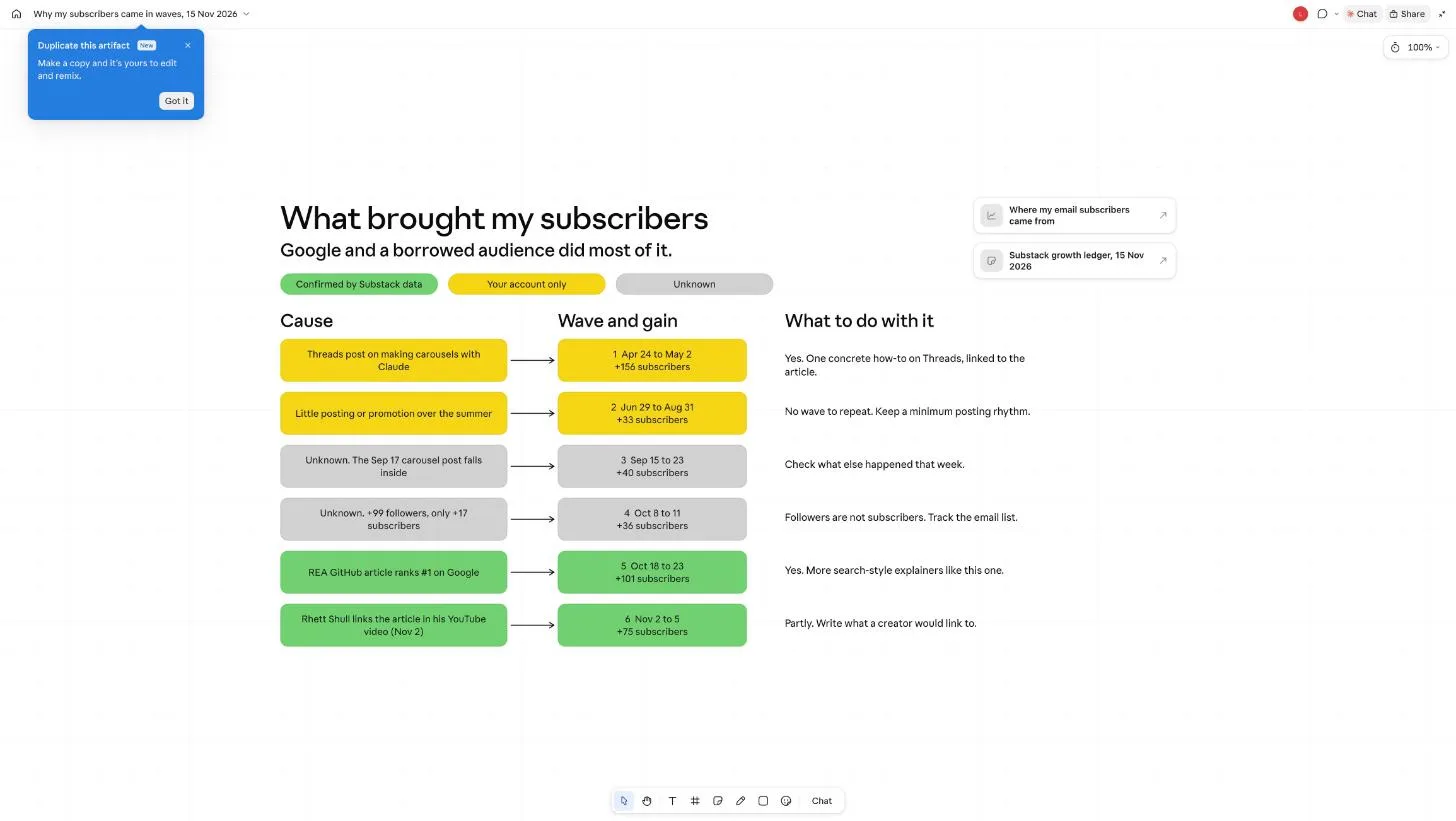
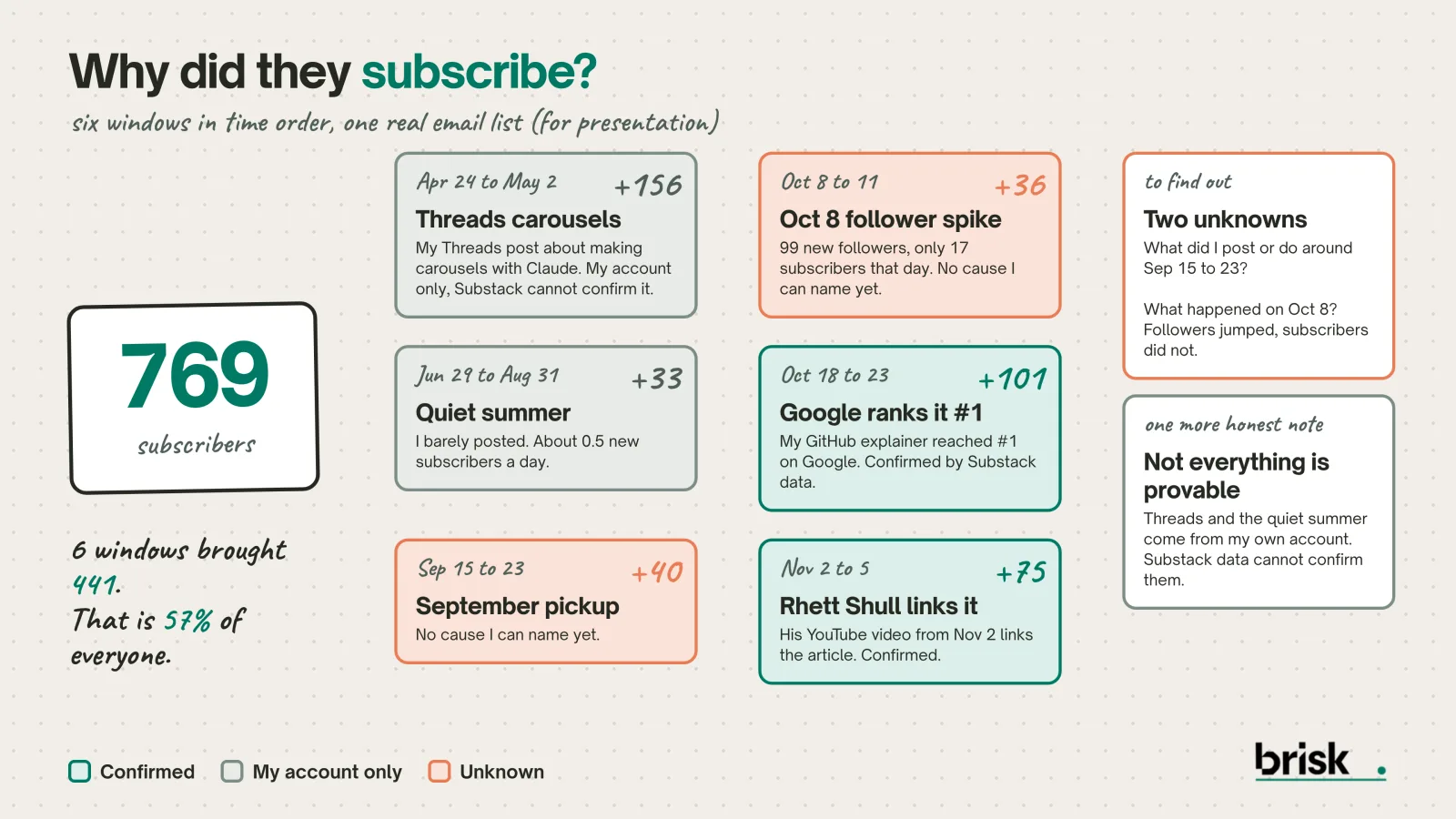
The question "which of these is certain and which is a guess?" works well here. In my test I asked Claude to colour each box by how sure I was: green for proven, yellow for my own account only, white for unknown. The colour did the thinking for me.
Copy this prompt:
"Lay out a two-week launch plan on a Whiteboard: design review, copy, beta invites, a pricing decision and launch day.
Put the dates on each block and draw the dependencies as arrows."
Then this one:
"Map my client journey from first contact to repeat client. One box per step, and mark the step where clients drop off in yellow."And this one:
"Here is a plan I am nervous about. Put it on a Whiteboard and add a red sticky note for everything that could go wrong, with one fix per note."Can you use your own brand colours in a Claude Whiteboard?
One limit you should know. The Whiteboard only takes full colours with names, like green, yellow and white. So I cannot give it my exact brand colours, teal and coral.
If you want your own colours, ask Claude, the same way I did. I asked for the board in brisk. colours and fonts, and I got a version with my cream background, my teal and my coral.
It came back as a picture, so it is no longer a drag-and-drop board. For a post or a slide that is fine. If you need to keep moving boxes, stay in the Whiteboard.
Copy this prompt:
"Take this board and rebuild it as a picture in my brand colours: [your hex codes].
Same boxes, same text, my fonts if you have them."
What does Claude Data do?
Data turns numbers into a page you can read. You get charts, tiles, a story that scrolls, even a short narrated video, depending on what you ask for. It is the renamed Dashboards, now out of beta.
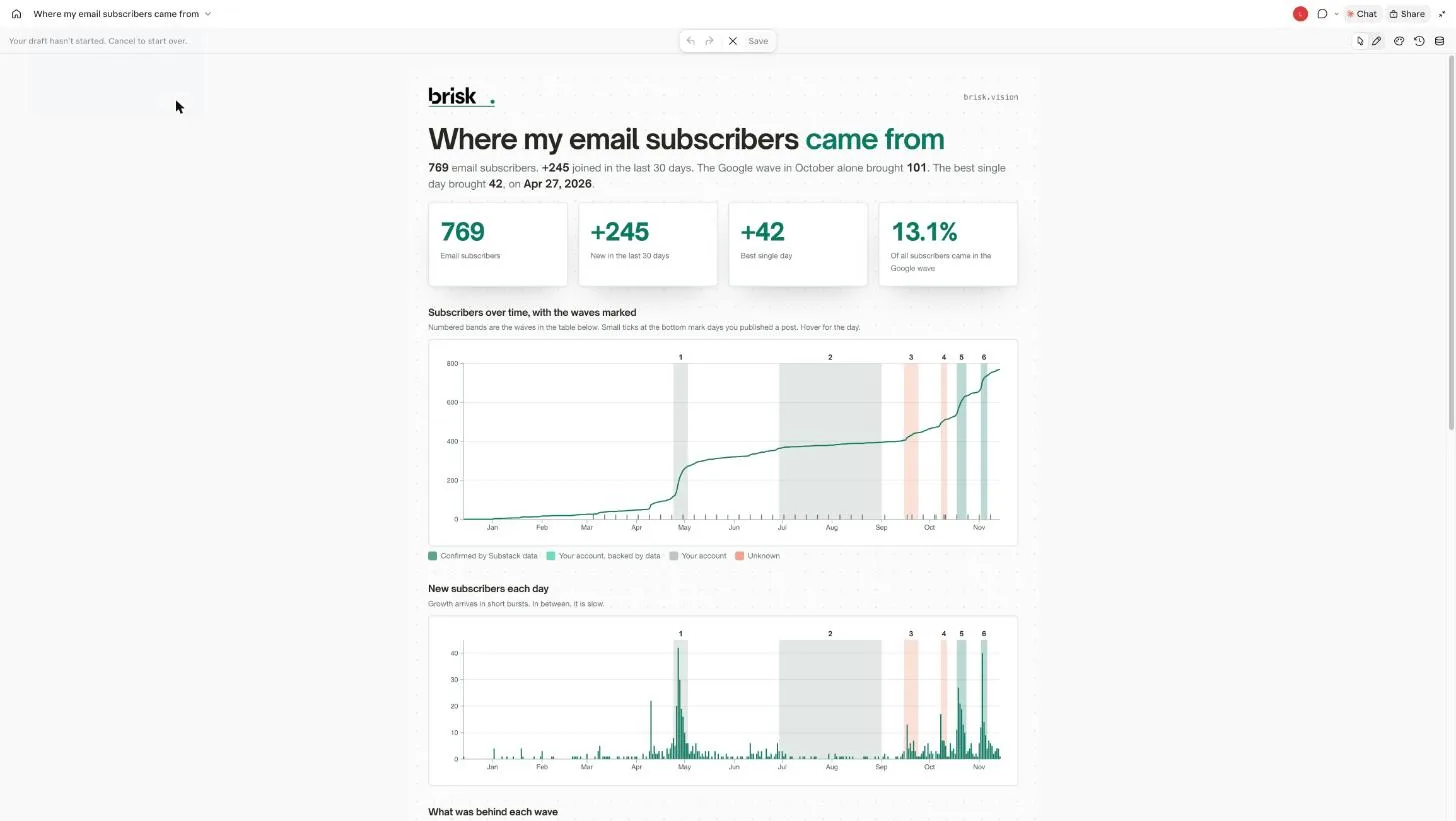
I gave it a file I had exported from Substack, and it built a page with a growth chart, the biggest jumps shaded and a breakdown by source. No formulas, no chart wizard, no drag and drop. I only described what I wanted to see.
That is the real saving. Normally a dashboard is a bigger project: pick the tool, connect the data, build the charts, fix the colours. Here it is all in one message. Super impressive.
The other thing to check is what the numbers actually say. Claude is fast, but it still draws what you ask for, so look at the page before you share it. Ask it to show you how each number was calculated.
Copy this prompt:
"I uploaded a file with one row per day.
Build a Data dashboard with the total, the best day and the five biggest jumps.
Shade the jumps on the chart and label each with its dates."
Then this one:
"Compare these two columns on one chart and list every day where one went up and the other did not."And this one:
"Turn this dashboard into a one-page summary I can send to a client, with three tiles and one sentence under each."How does sharing a Claude artifact work?
Here is why this is bigger than "Claude can make a table". Every artifact is a hosted page with its own link. It stays private to you until you decide to share it.
That means you build something in a chat and send the link instead of an attachment. Your client sees the live version, not a copy that is out of date by lunchtime. And on a board, several people can work at once.
You can also take things out of Claude when you need to. A Doc can go to Word, PDF or Google Docs, and a Sheet downloads as an Excel file. So you are not locked in.
One warning from my own test. A shared page is one share away from anyone with the link, so think before you send it. My pages held real business numbers, so I kept them private and used screenshots here.
Does Claude replace Microsoft 365?
Not yet. But look at the direction. Docs, Slides, Sheets, Whiteboards, Design, Data and soon Meetings is the shape of an office suite, built around a chat instead of around files.
Here is my verdict for a solopreneur or a small team.
Where Claude already wins: getting from idea to a first version in one message, keeping everything in one place, and sharing a link. If your spreadsheet is a tracker and your whiteboard is a quick plan, you may not need the old tools for those jobs.
Where the old tools still win: heavy spreadsheets with big models, macros and a lot of tabs, shared team libraries, deep Miro templates, and anything your clients require in a specific file format. Sheets and Whiteboards are in beta, and Anthropic says so.
What I would actually do: do not cancel anything this week. Move one small job into Claude, use it for two weeks, then decide. That is how you find out what you really use.
How do Sheets, Whiteboards and Data work together?
To see how the tools fit together, I gave them one shared job. I used a set of exported email subscriber numbers, but any dated numbers would do. The data is just the test material here, not the story.
Data gave me the shape: one chart, the biggest jumps shaded, a breakdown by source. A Sheet turned those jumps into a ledger with formulas, so I could check the totals and change the dates. A Whiteboard let me write down what I thought caused each jump and colour it by how sure I was.
That is the pattern I would copy. Data answers "what happened", a Sheet answers "how much", and a Whiteboard answers "why". You only needed one chat for all three.
The same pattern works for sales, support tickets, website visits or ad spend. If it has a date and a number, you can run it.
Which Claude tool should you use for which job?
If you are not sure where to start, use this as a shortcut.
- You have a list that changes: use a Sheet.
- You have an idea with parts and arrows: use a Whiteboard.
- You have a file of numbers and a question: use Data.
- You have words to write or present: use Docs or Slides.
- You need to send it to someone: share the link, or export it.
What mistakes should you avoid?
Moving everything at once. Pick one tracker and one plan. If you migrate your whole life in a weekend, you will go back to the old tools by Wednesday.
Trusting the first version. Claude builds fast, and fast is not the same as right. Check the formulas, check a few numbers by hand, and ask Claude how it calculated each one.
Sharing without looking. A link is easy to send and hard to take back. Read the page as a stranger would before you share it, and keep private numbers private.
Skipping the export. Keep a copy of anything important outside Claude, as a file you own. These tools are new, and one of them is still in beta.
Bonus: a clip to show off
Motion is one of the other artifact types, and I made a 40 second hand-drawn clip with HyperFrames, a separate video tool. It draws a growing line on paper and adds short captions as it goes. You can watch it in the Substack version of this article.
I made it because a moving line is easier to post than a link. If you try it, tell Claude that every number must come straight from your file. A pretty clip with a wrong number is worse than no clip.
A 30 minute plan for this week
You do not need a big project. You need one real job for each tool.
Minutes 1 to 10, Sheets. Take the tracker you update by hand most often and ask Claude to rebuild it as a Sheet. Paste your current rows so it has something real to work with.
Minutes 11 to 20, Whiteboards. Take one plan that is stuck in your head, dictate it, and let Claude lay it out. Then ask it to colour each box by how sure you are.
Minutes 21 to 30, Data. Export one set of numbers you check regularly and ask for a dashboard. Look at it for two minutes and decide if you would have built the same thing yourself.
Save the prompts that worked. If you use the same one every week, turn it into a repeatable routine, like I explain in Prompt vs Skill vs Workflow.
Verdict
- Sheets: open it first for trackers, budgets and lists. Skip it for complex models.
- Whiteboards: open it when you need to turn a messy idea into a plan. Expect named colours only.
- Data: open it when you have a file of numbers and want to see the shape fast.
- Skip: all three if you only need ten rows. A table in the chat is enough.
If I had to pick one for most small businesses, I would pick Sheets. Almost everyone uses a tracker, and it is the easiest tool to compare against what you already pay for.
Honest limits
I used each tool once, on one small job. I tested Data with files I uploaded, so I cannot tell you how it behaves with other sources. Sheets and Whiteboards are in beta, and features and limits can change.
Plan details and admin settings come from Anthropic's launch post and news coverage, so check your own plan before you rely on them. The idea that Claude replaces your whole stack is a direction, not a fact today.
Frequently asked questions
What are Claude Sheets, Whiteboards and Data?
They are three artifact types that Anthropic launched on 10 November 2026. Sheets builds spreadsheets with real formulas, Whiteboards lays out plans and brainstorms as boards, and Data turns a file of numbers into a dashboard. You can share each one with a link.
Are Claude Sheets and Whiteboards free?
Anthropic lists them for paid plans. On a Team plan all three are on by default; on Enterprise, an admin has to switch Whiteboards and Sheets on first.
Can Claude Sheets replace Excel?
For trackers, budgets, lists and simple models, often yes. Anthropic says Sheets has simple spreadsheet functionality for now, so heavy models with macros and many tabs should stay in Excel. A Sheet downloads as an Excel file.
Can I use my brand colours in a Claude Whiteboard?
Not directly. The Whiteboard only takes named colours like green, yellow and white. Claude can rebuild the board as a picture in your brand colours, but then it is no longer a board you can drag around.
Is a shared Claude artifact private?
Each artifact stays private until you share it. Once you share the link, anyone with it can open the page, so check the content before you send it and keep private numbers private.
Your move: pick the tracker you update by hand every week and ask Claude to rebuild it as a Sheet.
PS: Tell me on LinkedIn which tool in your stack you would cancel first.
Keep going: Prompt vs Skill vs Workflow · Claude Code Without the Terminal · Claude in Excel
Sources
All checked on 15 November 2026.
- Claude Whiteboards, Claude Sheets, and Claude Data, Claude blog, Anthropic, 10 November 2026
- Anthropic tiptoes into MS Office territory, The Register, 10 November 2026
This article first appeared in my Substack newsletter, where I send one practical AI article every week.
Want this built for your business?
We audit one workflow, build the system on your tools and hand it over with documentation.